Zamam Fleet

Every vehicle, every status, every document.

Know which vehicle is where, with whom, in what condition and at what cost, with a history behind every change.

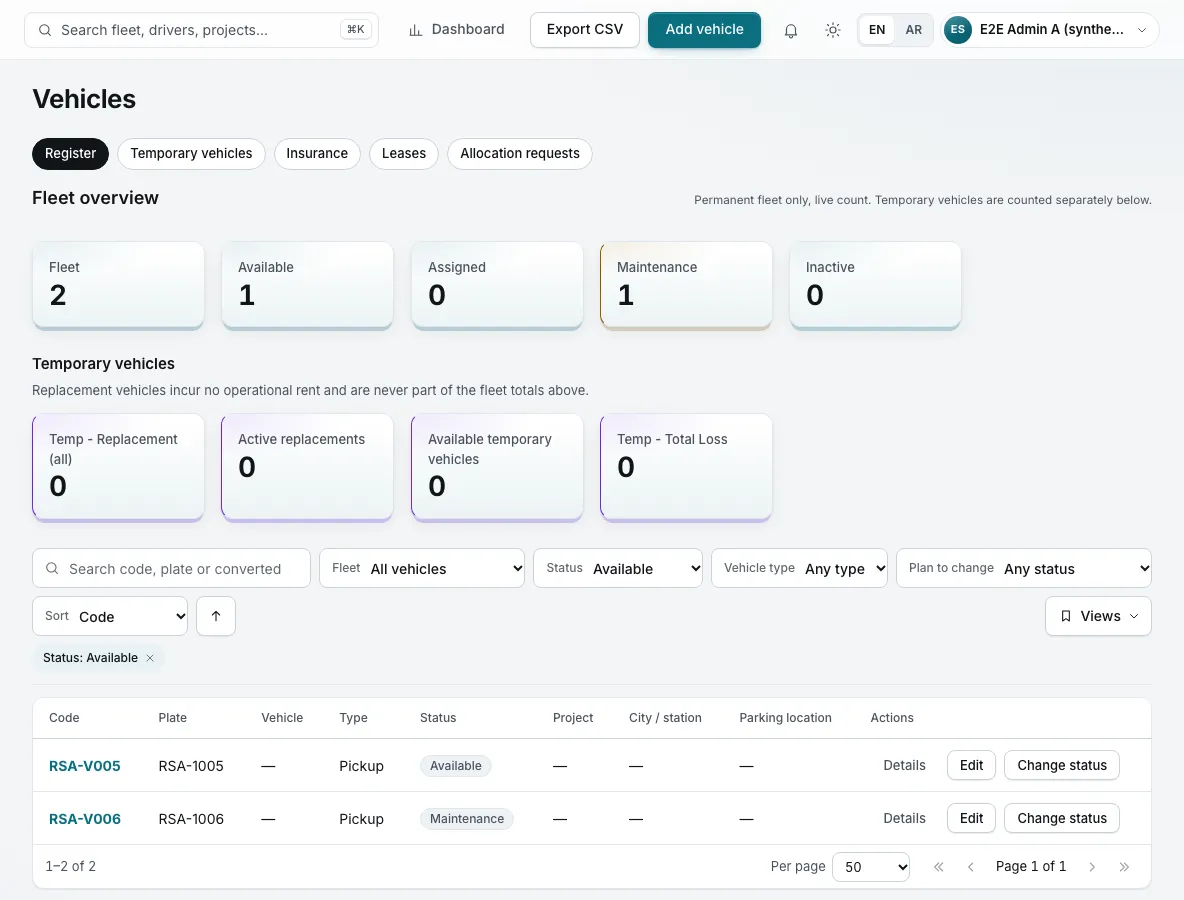
Vehicle register with fleet overview tiles and temporary vehicles
Synthetic demo data

Vehicle register and status lifecycle

A status you can trust, because it is earned.

Each vehicle carries its code, plate and converted plate, make, model, type, ownership, project, city, parking location, odometer and documents. Some statuses can only come from real events: a vehicle becomes Assigned through an allocation and Inspection failed through a failed inspection, never by picking from a list.

Status lifecycle of a permanent vehicle

  1. 1

    Available

    Registered, ready to allocate

  2. 2

    Assigned

    Allocated to a driver and project; the driver accepts with a checklist

  3. 3

    Maintenance

    Work order opened, or a return found damage

  4. 4

    Inspection failed

    A failed inspection grounds the vehicle

  5. 5

    Back in service

    Completion returns it to its driver or to Available

Every transition writes status history with the person and the reason. Parked and Inactive are also available; temporary vehicles have their own pool statuses.

Allocations and handover checklists

Custody that is signed for, item by item.

Send an allocation request to a driver. The driver answers every checklist line in the app with OK, Defect or N/A and accepts or rejects with a reason; nothing is assumed OK. Handovers record odometer, fuel level, warning lights, required photos, damage marks on the vehicle diagram and a custody declaration, and print as an English or Arabic A4 PDF.

  • Overlapping allocations are blocked
  • Seeded KSA commercial vehicle template: 7 sections, 29 items
  • Photos: front, rear, left, right and odometer
  • Return compares with the handover; damaged or missing items send the vehicle to maintenance

Temporary replacements

Keep the driver working while the vehicle is in the shop.

When a permanent vehicle with a driver goes into maintenance, assign a temporary replacement from the pool. It takes over the original vehicle's driver and project, the original stays in maintenance, and ending the replacement returns the temporary vehicle to the pool without closing the work order.

  • Temporary vehicles are counted separately from the fleet totals
  • No operational rent on the replacement; the original keeps billing
  • Pool statuses: Temp replacement, Temp total loss, Assigned (Temp)

Running the vehicles

Maintenance, fuel and incidents, with approvals built in.

Maintenance

Service requests and preventive schedules by date and kilometres. Work orders go from estimate to approval, parts and labour lines, completion evidence and a safe return to service. One open work order per vehicle; downtime is tracked; completion tells the driver the vehicle is ready.

Fuel

Entries by vehicle, driver and project with station, litres, unit price, amount, odometer and receipt. Duplicates are detected, entries are approved, and consumption trends flag anomalies per vehicle. Set each vehicle's fuel average to estimate litres from distance.

Incidents and damages

Location and time, parties, description, evidence, police or Najm reference, insurer and responsibility. Recovery and cost are allocated to the driver, the project or a vendor after approval. A driver's accident request opens or links the incident.
Maintenance work order

  1. 1

    Request

    From the office, a driver request or a failed inspection

  2. 2

    Estimate

    Workshop or outsourced garage

  3. 3

    Approve

    Through your approval chain

    ApproveReject
  4. 4

    Parts and labour

    Actual cost plus additional charges

  5. 5

    Return to service

    Driver notified; temporary replacement released

Insurance and leases

Policies and contracts that remind you before they lapse.

Record each vehicle's insurance policies with insurer, reference, cover, dates, cost and document; the vehicle card shows the active policy. Record vendor leases with dates, monthly amount and renewal reminder days; Zamam marks renewal due within 30 days and renewal overdue once the end date passes. A terminated lease can no longer be edited.

  • Insurance expiry feeds the expiry alerts
  • Vendor leases are separate from client contracts
  • Saudi plate stored as letters, number and type

Document expiry

Expiry dates you hear about in time.

Registration, insurance and other vehicle documents sit in the vehicle's document vault with their expiry dates. Expiry alerts go out 30, 15 and 5 days before and the day after, and admins get one daily compliance digest instead of a flood of messages.

  • Each alert sent once per document and day
  • Delivery visible in the communication history
  • Driver documents follow the same rules

Vehicle costs

What each vehicle really costs.

The vehicle costs board brings rent, maintenance, fuel and incident costs together by vehicle, project and period. Every figure states its definition, period and freshness, and a linked tile opens the records behind it. An unavailable value is shown as unavailable, not as zero.

  • Period picker: today, week, month, year or custom
  • Maintenance shows estimated cost, labelled, until an actual exists
  • Widgets you cannot see are left out, not shown as zero
Vehicle register with fleet overview
Synthetic demo data

Fleet questions

Questions, answered.

More answers on the FAQ page.

Why can't I set a vehicle to Assigned by hand?

Assigned comes from an allocation and Inspection failed from an inspection, so the status always matches a real record.

Are temporary vehicles in my fleet totals?

No. They have their own tiles and are excluded from the permanent fleet totals.

Can a driver accept a vehicle with an unanswered checklist line?

No. Every line needs OK, Defect or N/A before the acceptance is recorded.

Can I import my vehicle list from Excel?

Yes. Our team helps you bring vehicles and drivers in from your spreadsheets during onboarding.

Put your whole fleet in one register.

0 SAR per month to begin. Our team helps you import your data.